Templates
Create a template
Save a checklist you send often, then start new requests from it.
Last updated · Facts checked
Go to Templates, select New template, name it, build its checklist and select Create template.
Steps
-
Open Templates
Select Templates in the sidebar, then New template (or the Create custom template tile).
-
Fill in the details
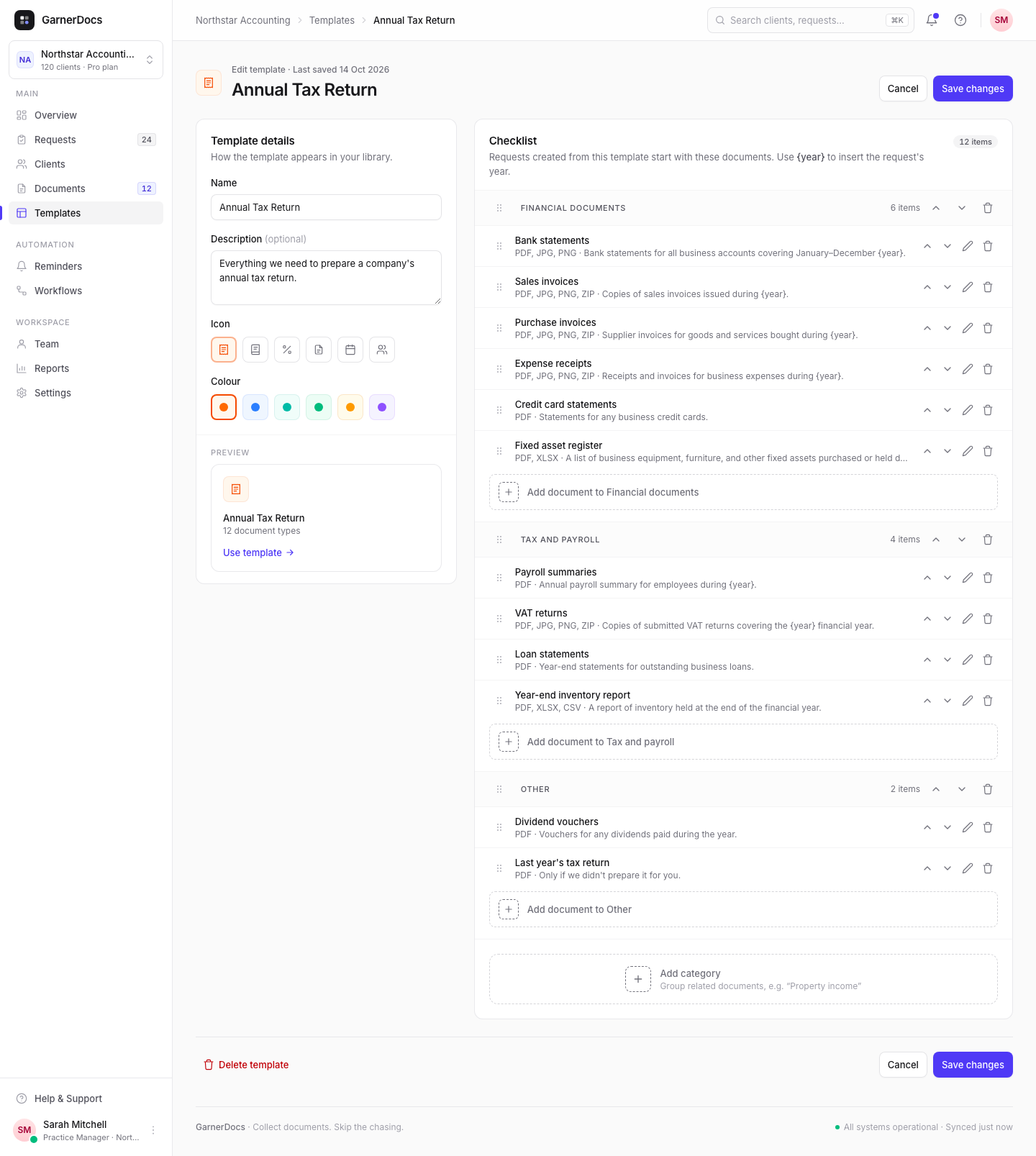
Give it a Name of up to 100 characters and an optional Description. Pick an Icon and a Colour. The Preview shows the card as it will appear in your library.
-
Build the checklist
Select Add category to start a group, then Add document to that category. For each document, set the Document name, an optional Description that your client sees under the name, and the Accepted file types. To ask for a fact such as a tax ID instead of a file, set the item's type to Short answer. See Ask for a short answer.
-
Save it
Select Create template. It's added to the Templates page.
Document settings
- Accepted file types: tick at least one of PDF, JPG, PNG, ZIP, XLSX, CSV, DOCX or HEIC.
- File size: every file can be up to 25 MB. You can't change that limit in the editor.
- Order: drag documents and categories, or use the arrow buttons. Requests keep this order.
- {year}: type
{year}in a category, document name or description, for example "Bank statements for {year}". In a new request it becomes the previous year, so 2025 for a request created in 2026.
A template needs a name and at least one document, and each document needs a name and a file type. A short answer only needs a name.
Use it in a request
Select Use template on its card, or pick it in the first step of New request. The request starts with the template's checklist and a title such as "Annual Tax Return 2025", and you can change both for that client before you send. See Create a request.
Starter templates
New workspaces start with three starter templates: Annual Tax Return, Monthly Bookkeeping and VAT / Quarterly Reporting. They're your own copies, so rename, edit or delete them to suit the documents you collect.
Good to know
- Everyone on your team can create templates.
- A template can hold up to 200 documents.