Workflows
Set up recurring document collection
Monthly, quarterly or annual requests from a template, sent or saved as drafts.
Last updated · Facts checked
A Recurring document collection workflow creates a request from one of your templates for each chosen client every month, quarter or year, and either emails it to them or saves it as a draft for you to send.
Before you start
Only owners and admins can set up workflows. You need a template with at least one document. Create a template. To send requests automatically, your file retention period must be confirmed. Confirm your retention period
Steps
-
Start a workflow
Select Workflows in the sidebar, then New workflow, then Recurring document collection.
-
Choose what to collect
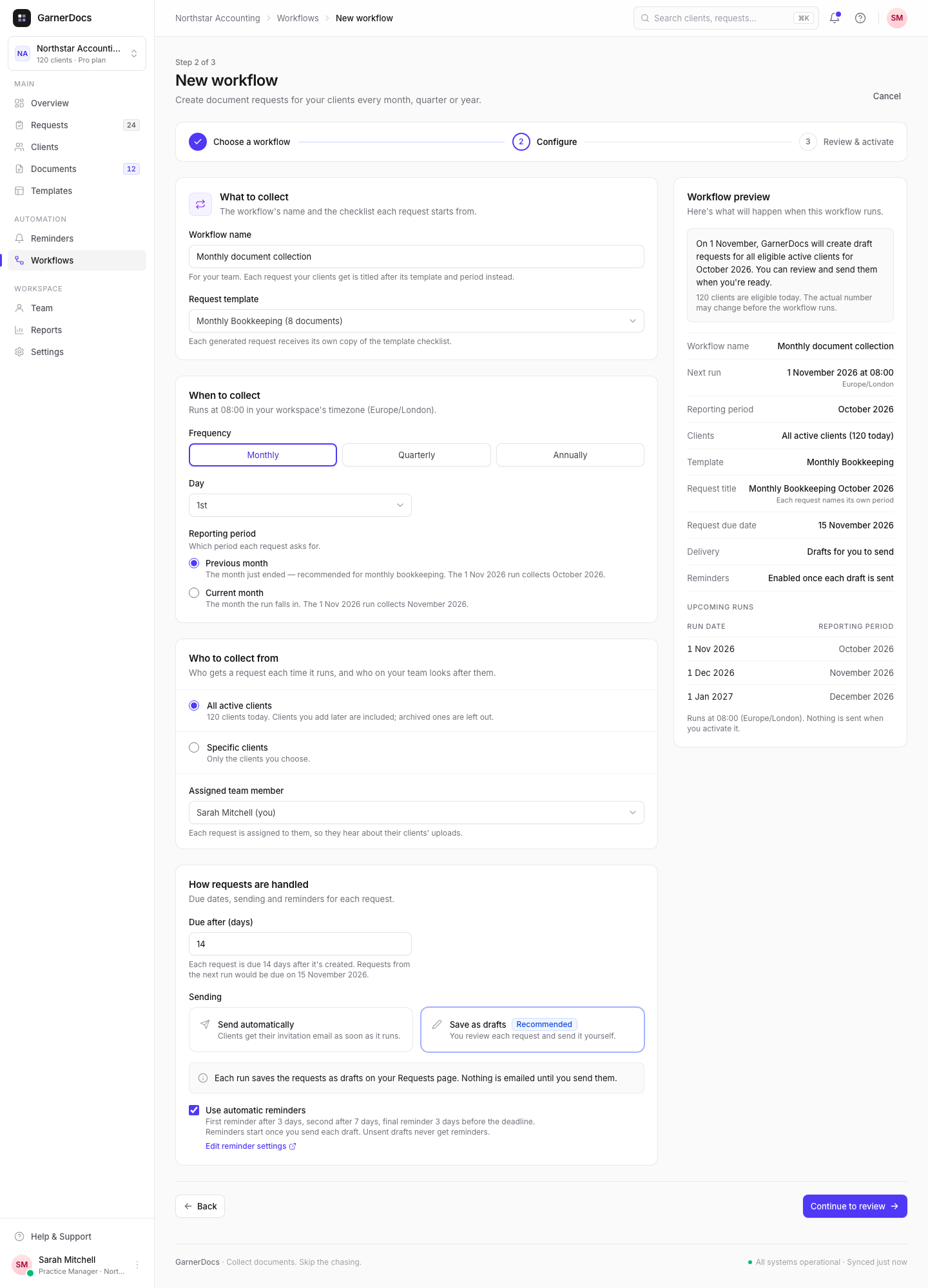
Under What to collect, name the workflow and choose a Request template. Each request gets its own copy of the template's checklist.
-
Choose when
Under When to collect, choose Monthly, Quarterly or Annually, then the Day (and the month for quarterly or annual runs). Then choose the Reporting period, for example Previous month or Current month.
-
Choose who
Under Who to collect from, choose All active clients or Specific clients. Optionally pick an Assigned team member for every request.
-
Choose how requests are handled
Set Due after (days), from 1 to 90. Under Sending, choose Send automatically or Save as drafts, and whether to Use automatic reminders.
-
Review and activate
Select Continue to review, check the summary, then select Activate workflow, or Save as paused to check it over first.
When it runs and which period it collects
Recurring workflows run at 08:00 in your workspace's time zone. A day a month doesn't have, like the 31st in April, falls on the month's last day.
Previous (month, quarter or year) collects the period that has just ended. Current collects the period the run falls in. Each request is titled with its template and period, for example "Monthly documents October 2026".
| Frequency | Runs on | Previous collects |
|---|---|---|
| Monthly | 1 November 2026 | October 2026 |
| Quarterly | 1 January 2027 | Q4 2026 |
| Annually | 31 January 2027 | 2026 |
While you configure it, Workflow preview shows the next run, the request title and due date, and an Upcoming runs table of the next three run dates with the period each collects.
Sending automatically
New workflows save drafts until you choose Send automatically. If you do, the review step asks you to confirm: "By activating this workflow, you authorize GarnerDocs to automatically create and email document requests to eligible clients on the configured schedule." You can't activate it without ticking this, and you're asked again when you resume a workflow saved as paused.
Good to know
- A client never gets two requests for the same workflow and period.
- All active clients includes clients you add later and leaves out archived ones.
- Drafts get reminders only once you send them.
- Changes apply to future runs only. Requests already created stay as they are.
{year}in a template's documents becomes the reporting period's year.